USB Drive Write Protection: 7 Fixes Before You Return a Bulk Lot
A drive that reports 'The disk is write-protected' is not the same fault as one that says 'Read-only.' Both stop you writing files, but only one is a setting you can clear at the keyboard. If you are staring at a bulk lot that will not take the preload, the difference decides whether you spend ten minutes in diskpart or open a claim with your supplier. This guide walks the seven most common fixes in the order you should actually try them.
Read-Only and Write-Protected Are Two Different Errors
Windows uses two separate messages and they mean different things. 'Read-only' usually describes the volume attribute - the file system is mounted so nothing can write, and the cause is often a toggle you can flip. 'Write-protected' is the stronger wording and can come from the controller firmware itself, which no Windows setting can override. The first check is not a fix at all: open the drive's Properties then Security and confirm your account has Write permission. If permission is fine, the lock is lower down the stack, and the steps below apply in order.
Check the Physical Switch, the Adapter and the OTG Cable
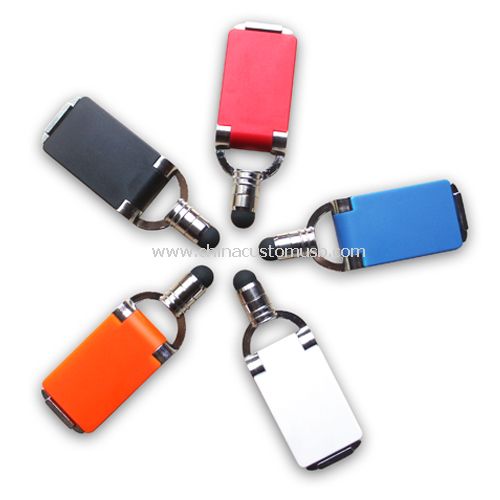
Some bodies carry a small slider on the connector side that mechanically forces read-only. If your drive has one, slide it toward the connector and re-insert. Many small bodies, including the clip-style drive shown below, carry no switch at all, so a software lock is the more likely cause on those.
Next, rule out the adapter. A micro-USB or USB-C OTG cable that presents the drive to a phone often mounts it read-only by design; the same drive in a laptop port may write fine. Swap the cable, then swap the port - try a port directly on the motherboard, not a front-panel hub. If the fault follows one specific cable or one specific machine, you have found the cause without touching software.
Clear the Read-Only Attribute with diskpart and Confirm It Stuck
When the lock is a volume attribute, diskpart clears it. Run diskpart, then list disk to find the drive by its size, select disk N (replace N with the number), and attributes disk clear readonly. Read the response: it should report 'Disk attributes cleared successfully.' Confirm with attributes disk and check that it now reads 'Current Read-only State : No.' If it clears and stays cleared, you are done. If it clears but the drive re-appears read-only after you unplug and replug, the attribute is being re-set by something outside Windows - usually firmware or a policy, covered next.
Registry and Group Policy Settings That Lock Removable Drives on Office Machines
Two Windows mechanisms lock removable media on managed PCs. The first is a registry value: HKEY_LOCAL_MACHINE\SYSTEM\CurrentControlSet\Control\StorageDevicePolicies, a DWORD named WriteProtect set to 1. Setting it to 0 and rebooting removes the lock. The second is Group Policy: Computer Configuration then Administrative Templates then System then Removable Storage Access contains entries such as 'Removable Disks: Deny write access.' If that is Enabled, no local registry edit will help - only the domain administrator can turn it off. On a personal machine neither exists by default, so if you see this lock on your own PC it usually means third-party encryption or backup software left a flag behind.
What Is Actually Locking the Drive
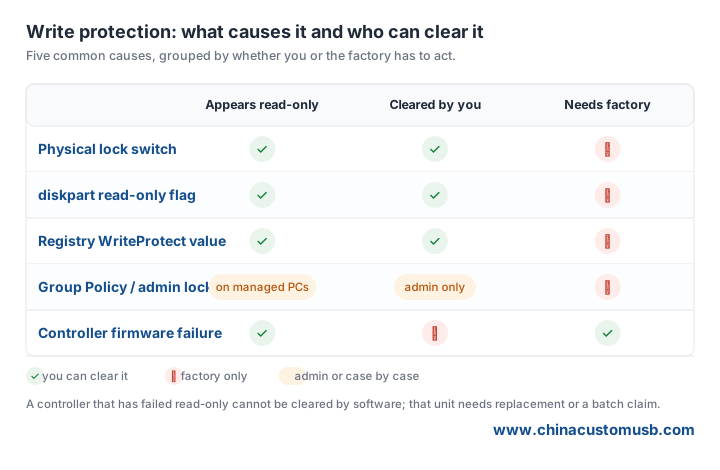
Before you decide repair versus replacement, map the symptom to the cause. The table below groups the five common locks by who can clear them.
When the Controller Has Failed: Repair, Rework or Replace the Batch
If diskpart reports success but the drive still rejects writes, or it flips back to read-only on its own, the controller firmware has locked the NAND - a hardware fault, not a setting. A single drive doing this is a returns item. A whole lot doing it is a batch defect, and the right move is to stop preloading, photograph the Windows error text and the connector, and open a claim rather than re-run the job. For preload operators, the practical rule is: clear the attribute once, write a test file, unplug, replug, and confirm the file is still editable. If it is not, the unit goes back before it reaches a customer. Send us the exact error text and a photo of the connector; we will tell you whether it is a setting you can clear or a batch defect to claim on.
Need custom USB drives for your next project?
Factory-direct pricing, free digital proof and a 7-day sample turnaround.
Get a free quote


